
Skip to Content
EFixPro
  • ERP modules
    • Commerce
    • POS Retail Retail POS
    • CRM CRM
    • sales Sales
    • Subscriptions Subscriptions
    • View all
    • Supply chain
    • Inventory Inventory
    • Purchasing Purchases
    • Manufacturing Manufacturing
    • Products Products
    • Repairs Repairs
    • View all
    • Finance
    • Accounting Accounting
    • Electronic Payroll Electronic payroll
    • electronic invoicing Electronic invoicing
    • Expenses Expenses
    • Documents Documents
    • View all
    • HR
    • Calendar Calendar
    • Employees Employees
    • Projects Projects
    • Helpdesk Helpdesk
    • Contacts Contacts
    • View all
    • Marketing
    • Website Websites
    • Email Marketing Email marketing
    • Events Events
    • Live Chat Live chat
    • Blog Builder Blog builder
    • View all
    • Industries
    • Restaurants and cafés
    • Retail and specialty stores
    • Technical services
    • Construction and maintenance
    • Hospitality and tourism
    • Bakeries and pastry shops
    • View all
    Commerce
    • restaurant-pos Restaurant POS
    • POS Retail Retail POS
    • CRM CRM
    • sales Sales
    • Subscriptions Subscriptions
    • View all
    Supply chain
    • Inventory Inventory
    • Purchasing Purchases
    • Manufacturing Manufacturing
    • Products Products
    • Repairs Repairs
    • View all
    Finance
    • Accounting Accounting
    • Electronic Payroll Electronic payroll
    • electronic invoicing Electronic invoicing
    • Expenses Expenses
    • Documents Documents
    • View all
    HR
    • Calendar Calendar
    • Employees Employees
    • Projects Projects
    • Helpdesk Helpdesk
    • Contacts Contacts
    • View all
    Marketing
    • Website Websites
    • Email Marketing Email marketing
    • Events Events
    • Live Chat Live chat
    • Blog Builder Blog builder
    • View all
    Industries
    • Restaurants and cafés
    • Retail and specialty stores
    • Technical services
    • Construction and maintenance
    • Hospitality and tourism
    • Bakeries and pastry shops
    • View all

    • Contact us
    • ​ Book a sales consultation
    • Live chat
  • EDUCATION
  • Industries
    • Restaurants and cafés
    • Retail and distribution
    • Technical services
  • ABOUT US
    • OUR COMPANY
    • SUCCESS STORIES
  • CONTACT US
    • Support

    • Service appointments
    • Group training (level 1)
    • Personalized session (non-accounting)
    • Accounting consultation
  • 0
  • 0
  • English (US) Español (CO)
  • Sign in
  • Book a sales consultation
EFixPro
  • 0
  • 0
    • ERP modules
    • EDUCATION
    • Industries
      • Restaurants and cafés
      • Retail and distribution
      • Technical services
    • ABOUT US
      • OUR COMPANY
      • SUCCESS STORIES
    • CONTACT US
      • Support
      • Service appointments
      • Group training (level 1)
      • Personalized session (non-accounting)
      • Accounting consultation
  • Book a sales consultation
  • English (US) Español (CO)
  • Sign in

How to create a product with variants

Learn to create a product with variants in Odoo 17 with our complete guide. Efficiently manage products with multiple versions and optimize inventory in Odoo.
  • All Blogs
  • V17 tutorials
  • How to create a product with variants
  • September 24, 2024 by
    How to create a product with variants
    TORRES PARRA DAVID FERNANDO

    In this tutorial, we will learn to create a product with variants in Odoo 17. Variants are useful when a product has multiple versions, such as different sizes, colors or styles. This process helps you efficiently manage these products and their variants in inventory. 

    Tutorial: How to create a product with variants 

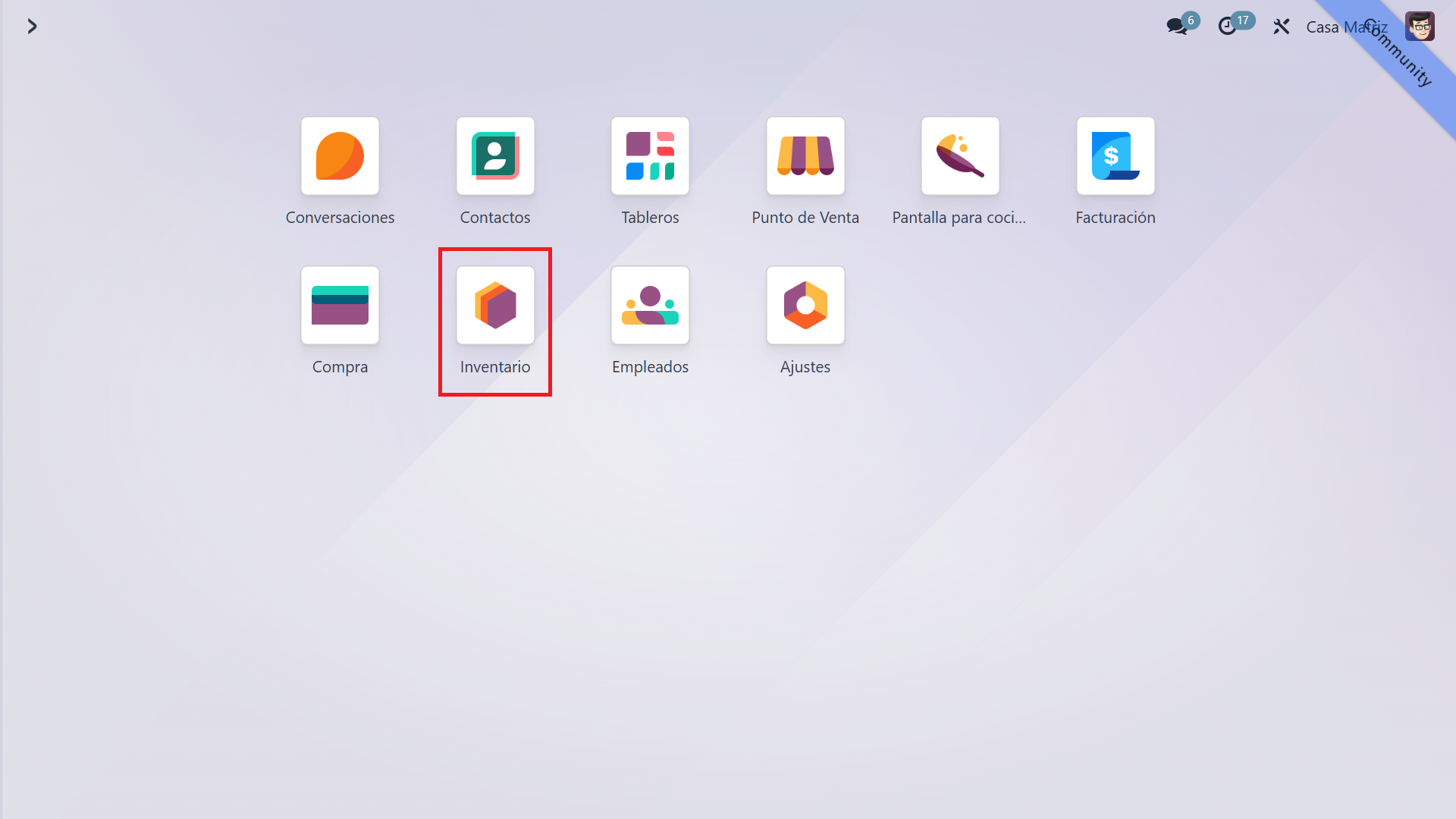
    1. Inventory in the main menu 

    In the Odoo main menu, select "Inventory".
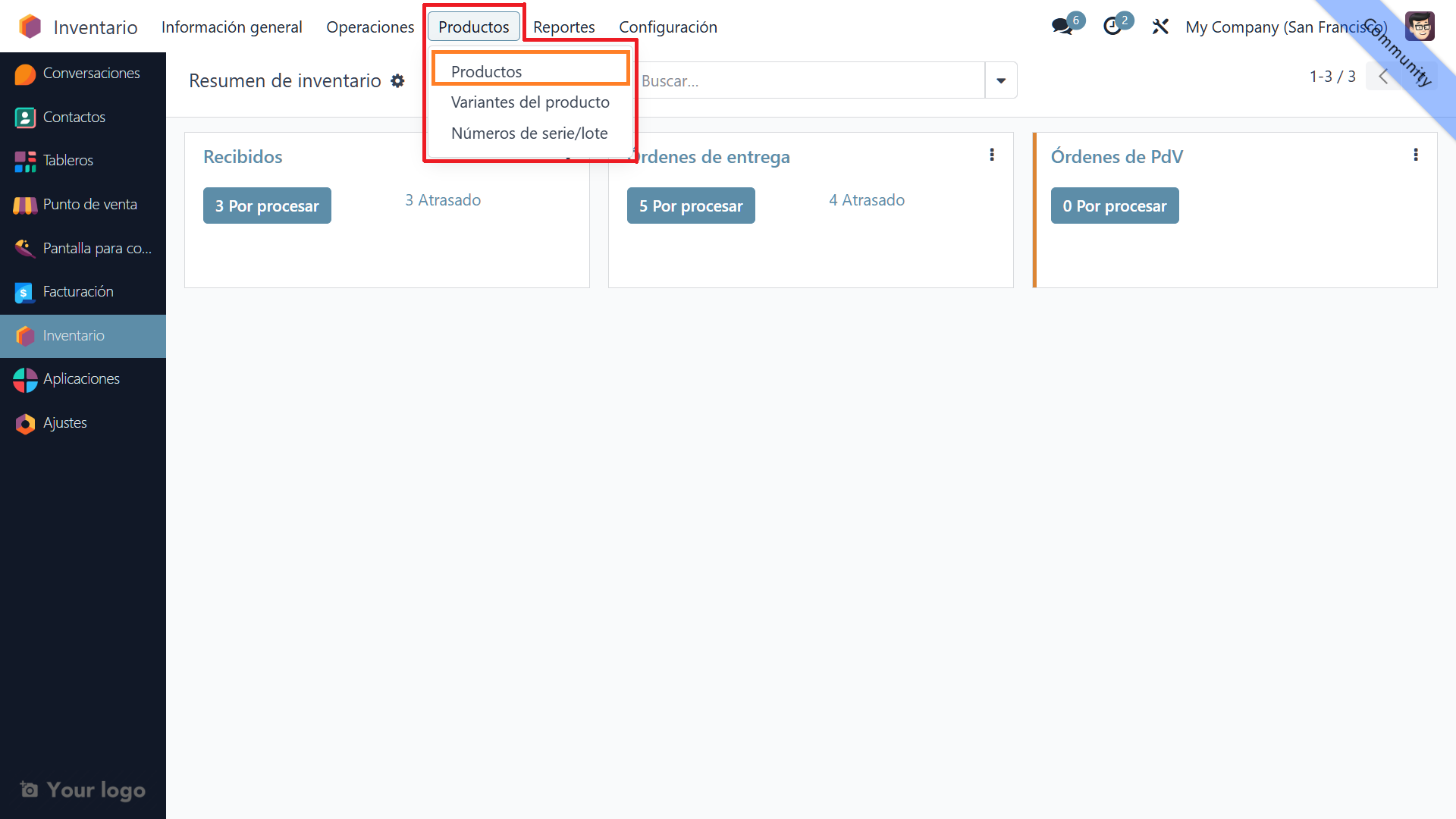
    2. Products in the top menu, then Products 

    At the top of the Inventory module, click "Products", then select "Products". You will see a list of all existing products.
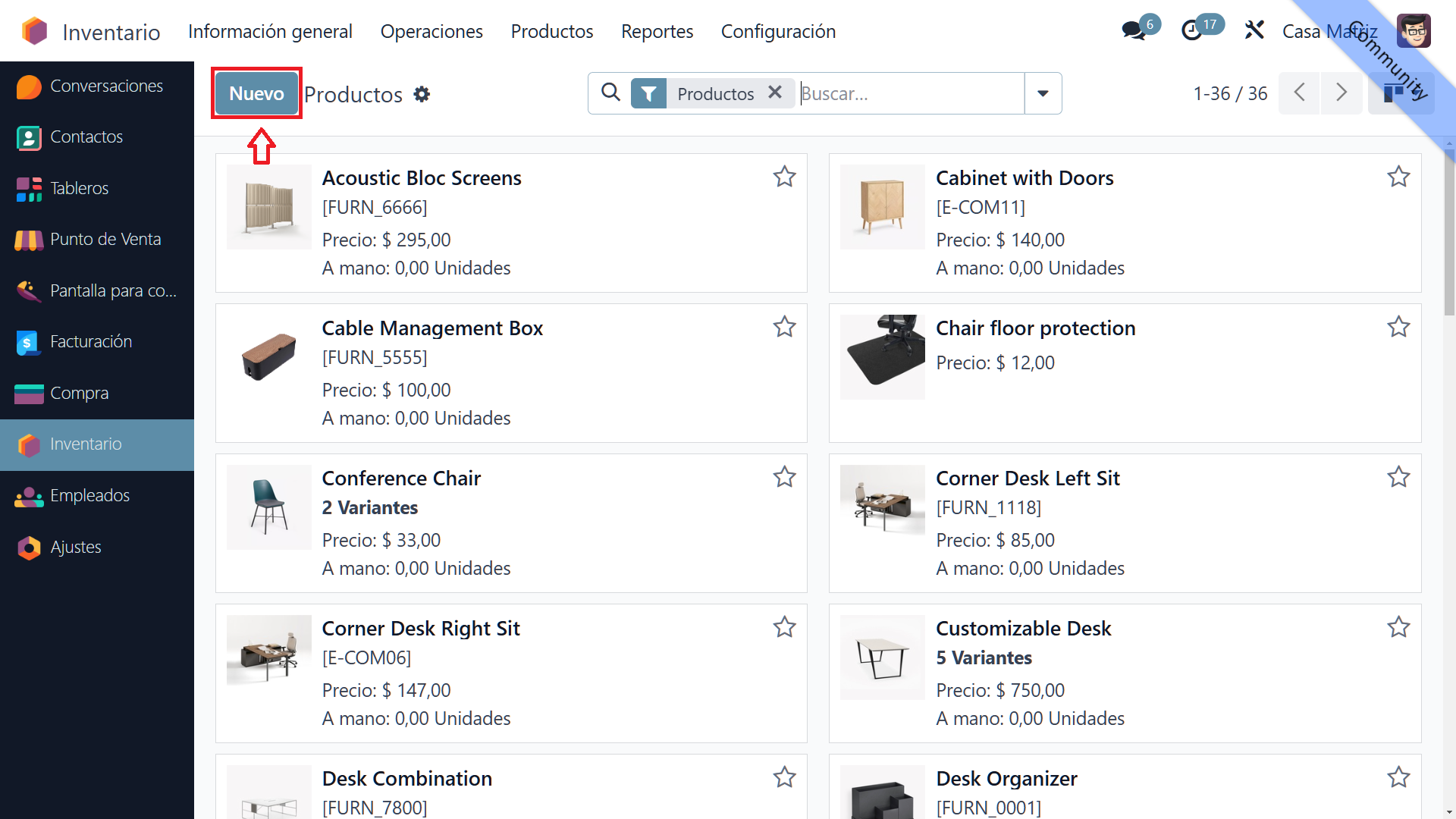
    3. The "New" button 

    To create a product, click "New" at the top of the screen. A form opens where you can enter the new product details.
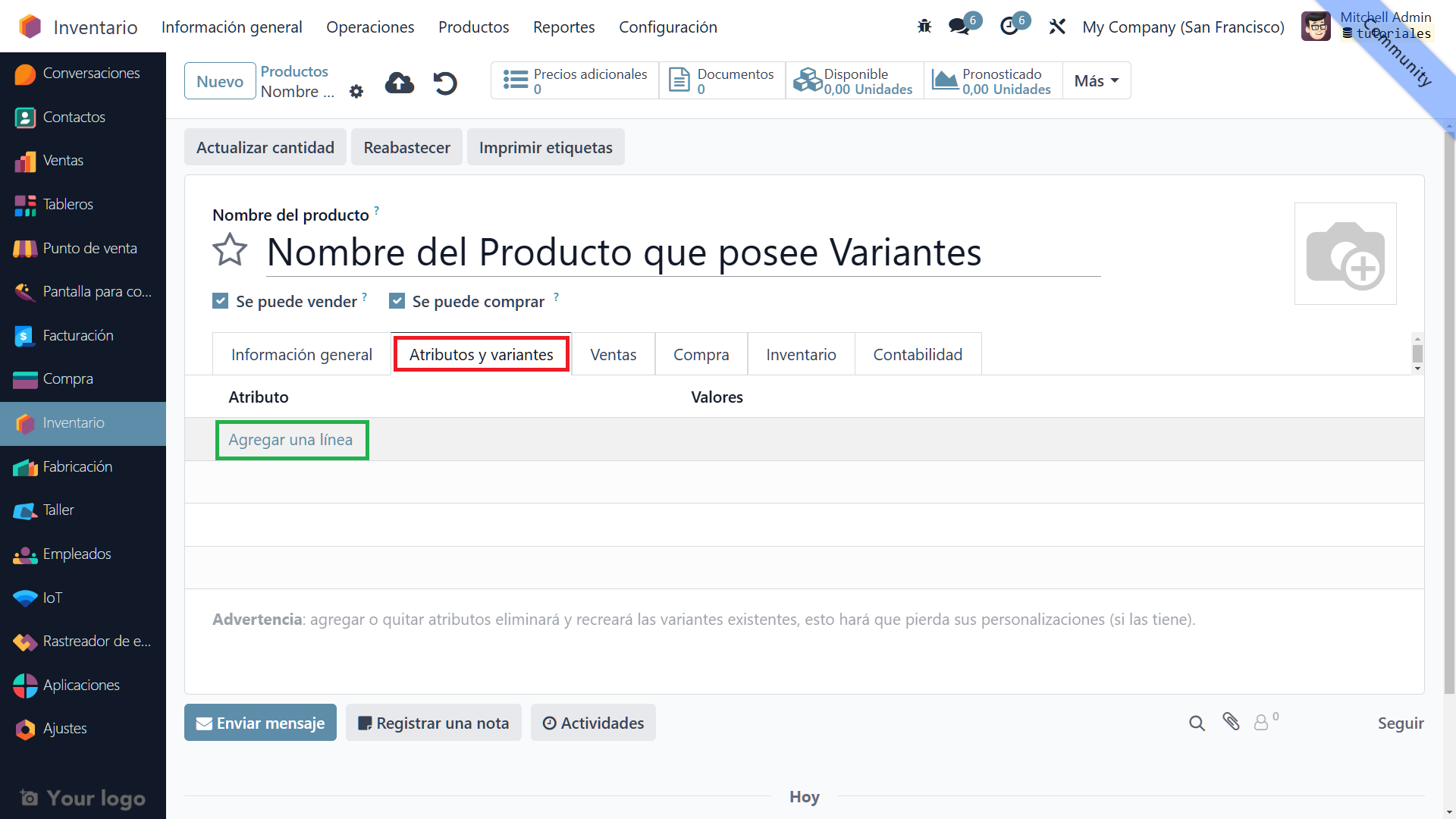
    4. The Attributes & Variants tab 

    This part of the tutorial does not cover creating the product itself

    Go to "Attributes & Variants". Here, you can add the attributes that define the product variants. 

    • Add a line: Click "Add a line" to begin adding product attributes.

    5. Add attributes 

    Select the relevant attributes. For a T-shirt, for example, the attributes might be "Size" and "Color".
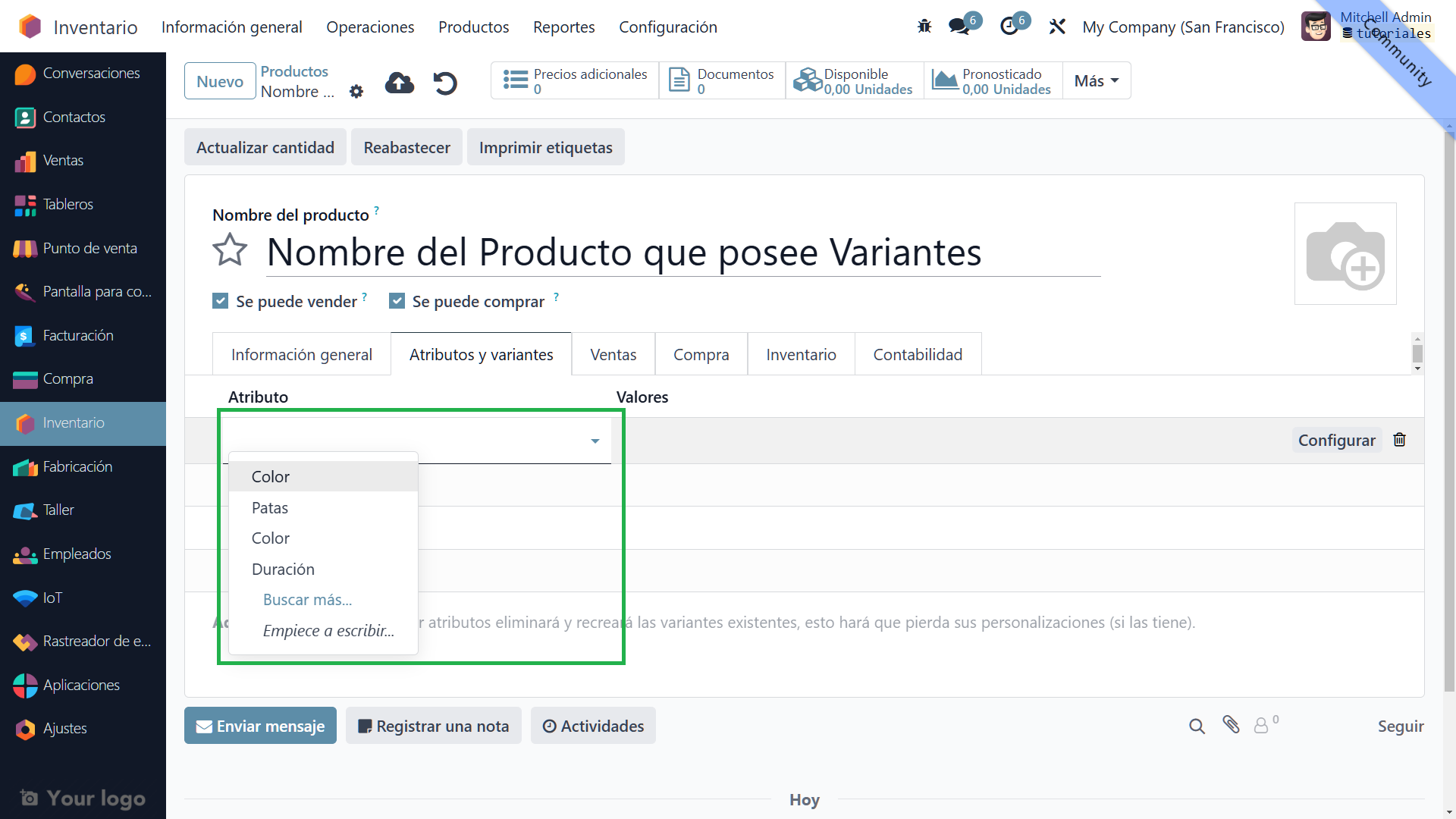


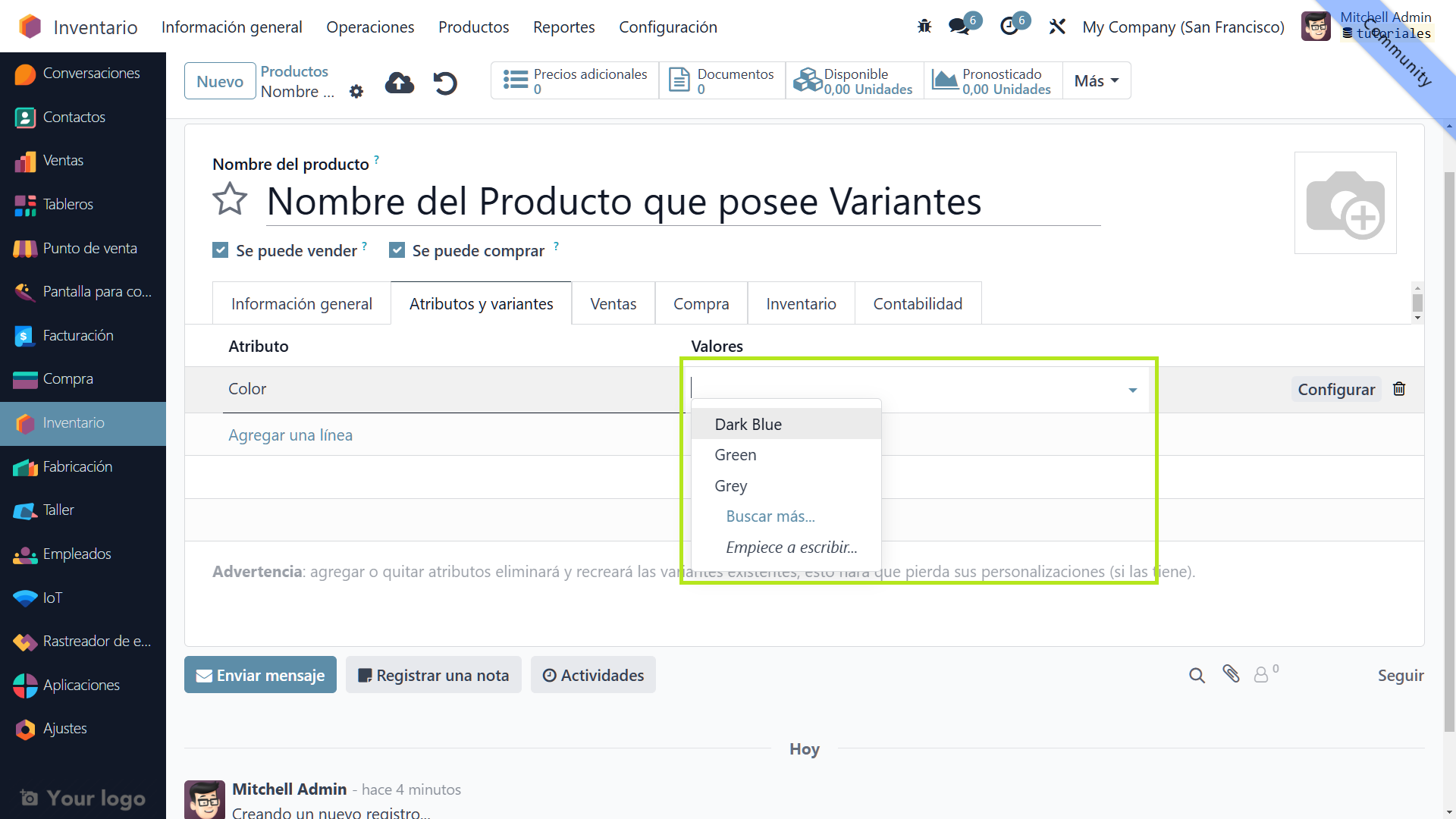
    6. Specify values 


    Specify each attribute's values. For "Size", you might add "Small", "Medium" and "Large". For "Color", you might add "Red", "Blue" and "Green".


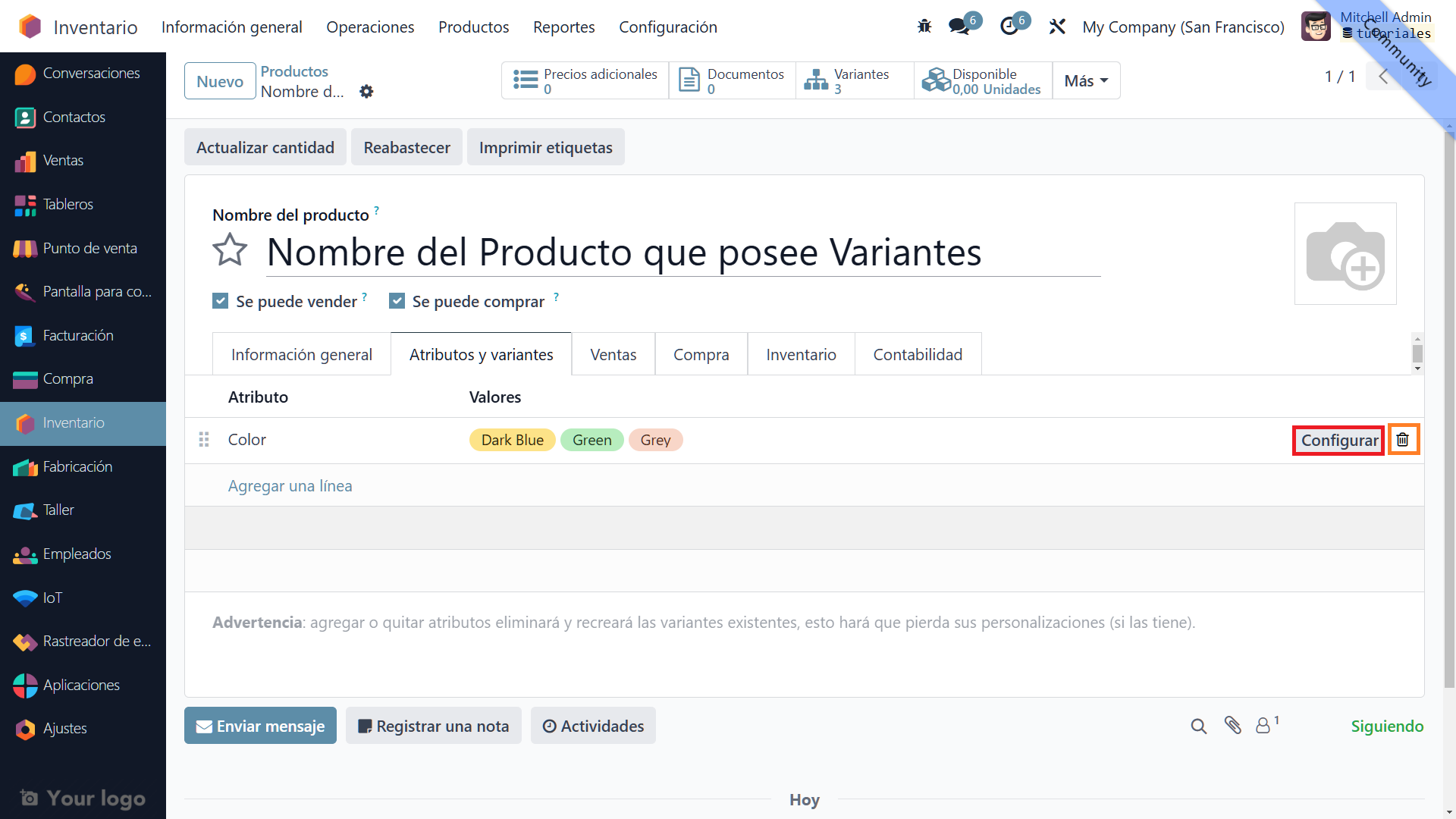
    7. Configure or remove a line 


    Once values are specified, configure each attribute as needed or remove lines if you decide not to use an attribute.


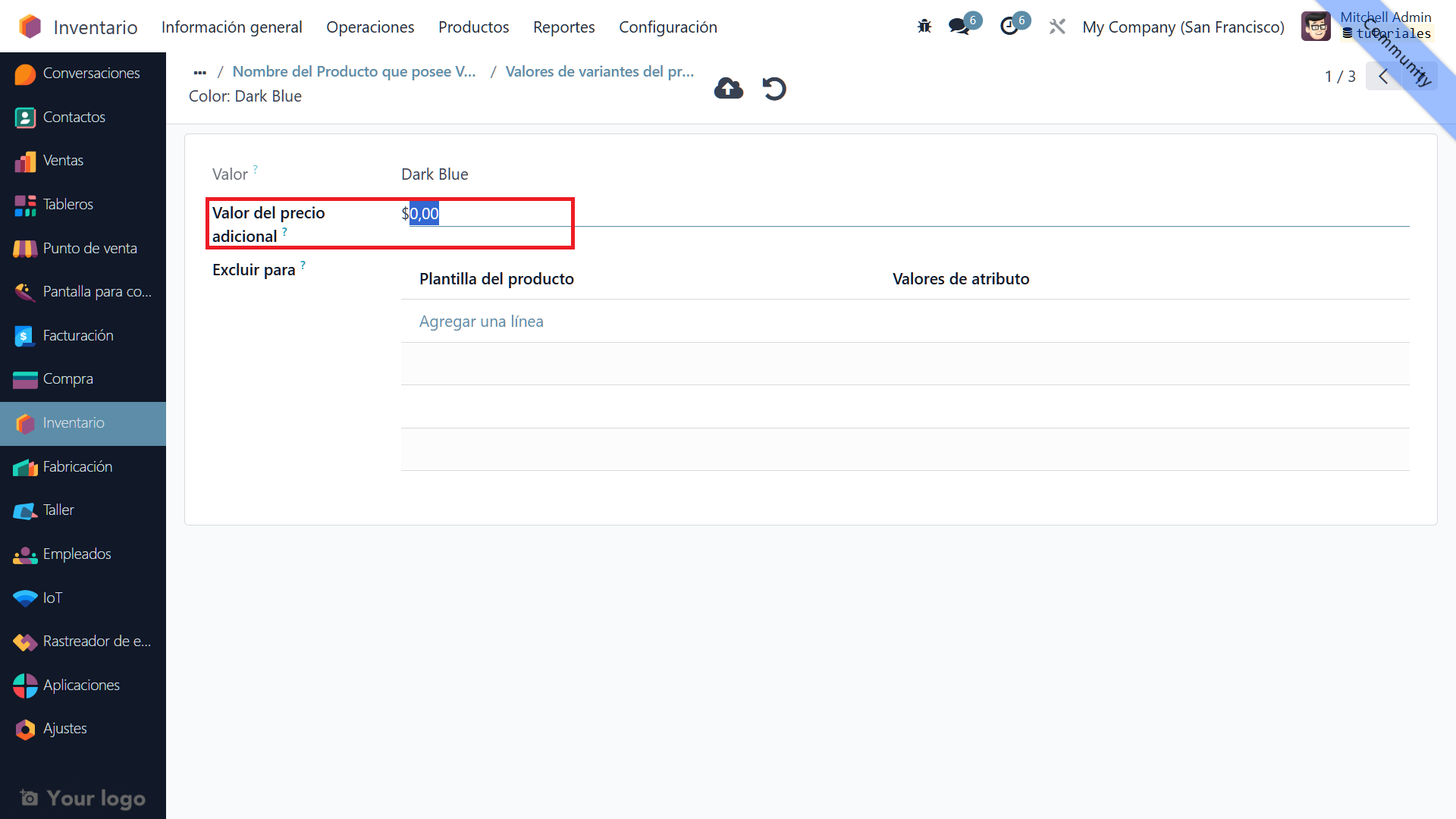
    8. View values with their additional prices 

    View the variant values alongside their additional prices. For example, the "Large" T-shirt variant might have an additional price.
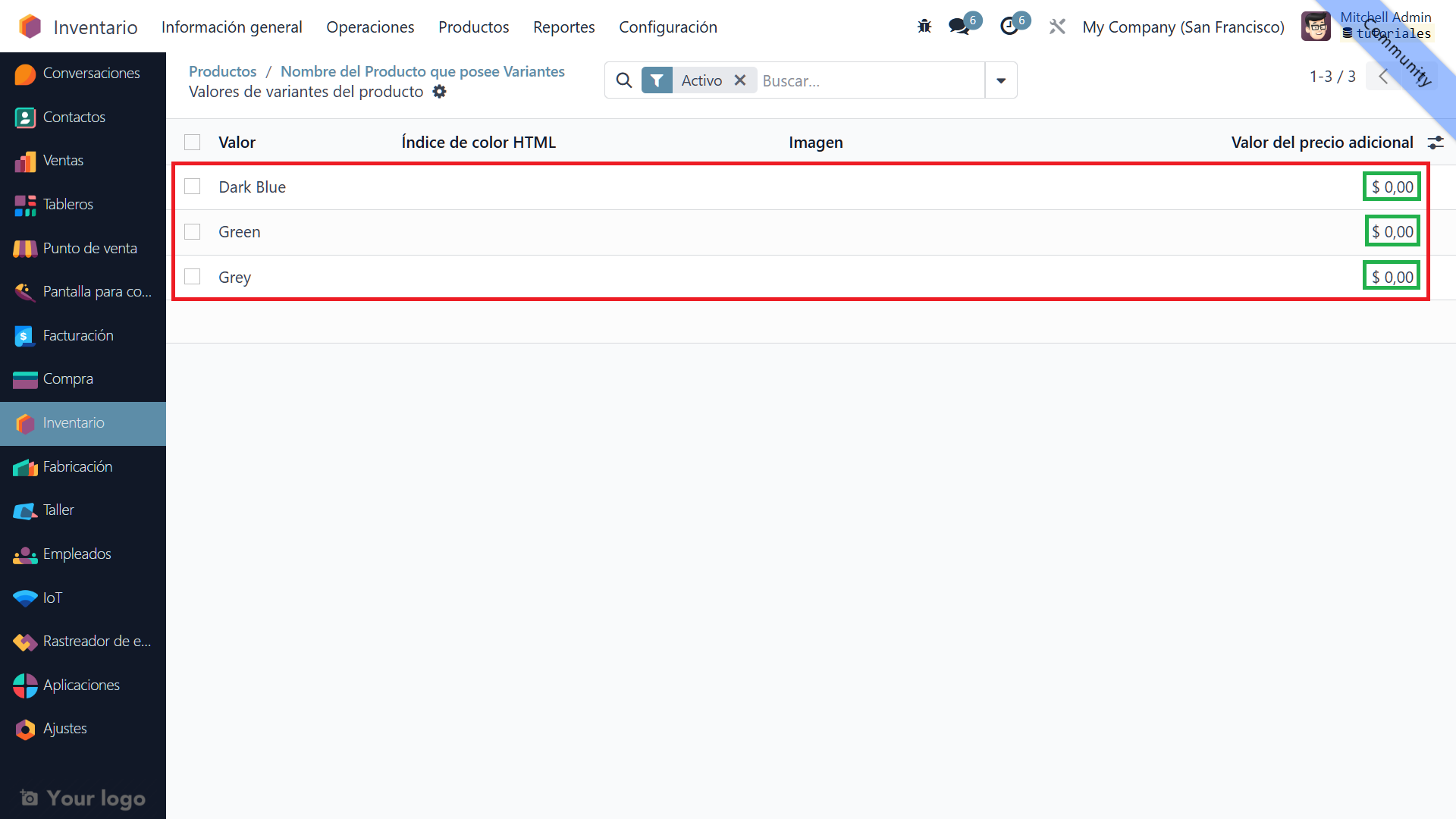


    9. Change the additional price 

    To change a variant's additional price, click one of the values you added. Adjust the additional price as needed. 


    You have successfully created a product with variants in Odoo 17!

    in V17 tutorials
    How to create a product with variants
    TORRES PARRA DAVID FERNANDO September 24, 2024
    Share this post
    Tags
    Our blogs
    • Tutorials
    • V15 tutorials
    • News
    • Success stories
    • V17 tutorials
    Archive
    How to create a product tracked by lots
    Learn to create a lot-tracked product in Odoo 17 with our step-by-step guide. Manage product traceability and expiration efficiently in Odoo, ideal for pharmacies and drugstores.

    Odoo V15

    At eFixPro, we are pleased to offer a series of detailed Odoo v15 tutorials designed to help you get the most out of this powerful business management tool. Our blog is packed with useful resources covering a wide range of topics, from initial setup to advanced features.

    View tutorials

    Odoo V17

    We are excited to introduce our blog dedicated to Odoo v17 tutorials, the latest version of this outstanding business management platform. At eFixPro, we have created resources designed to help you discover and master the new features and improvements in Odoo v17.

    View tutorials
    EFixPro

    We transform businesses with Odoo ERP.

    Services
    • View all
    • Sales
    • Accounting
    • Inventory
    Company
    • About us
    • Success stories
    • Contact us
    Contact

    Calle 49 #49-11

    +57 604 2010998

    [email protected]

    Mon - Fri: 8:00 to 18:00

    © 2026 EFixPro S.A.S. — All rights reserved.
    Terms and conditions Privacy policy
    Powered by Odoo — The best open source eCommerce.