
Skip to Content
EFixPro
  • ERP modules
    • Commerce
    • POS Retail Retail POS
    • CRM CRM
    • sales Sales
    • Subscriptions Subscriptions
    • View all
    • Supply chain
    • Inventory Inventory
    • Purchasing Purchases
    • Manufacturing Manufacturing
    • Products Products
    • Repairs Repairs
    • View all
    • Finance
    • Accounting Accounting
    • Electronic Payroll Electronic payroll
    • electronic invoicing Electronic invoicing
    • Expenses Expenses
    • Documents Documents
    • View all
    • HR
    • Calendar Calendar
    • Employees Employees
    • Projects Projects
    • Helpdesk Helpdesk
    • Contacts Contacts
    • View all
    • Marketing
    • Website Websites
    • Email Marketing Email marketing
    • Events Events
    • Live Chat Live chat
    • Blog Builder Blog builder
    • View all
    • Industries
    • Restaurants and cafés
    • Retail and specialty stores
    • Technical services
    • Construction and maintenance
    • Hospitality and tourism
    • Bakeries and pastry shops
    • View all
    Commerce
    • restaurant-pos Restaurant POS
    • POS Retail Retail POS
    • CRM CRM
    • sales Sales
    • Subscriptions Subscriptions
    • View all
    Supply chain
    • Inventory Inventory
    • Purchasing Purchases
    • Manufacturing Manufacturing
    • Products Products
    • Repairs Repairs
    • View all
    Finance
    • Accounting Accounting
    • Electronic Payroll Electronic payroll
    • electronic invoicing Electronic invoicing
    • Expenses Expenses
    • Documents Documents
    • View all
    HR
    • Calendar Calendar
    • Employees Employees
    • Projects Projects
    • Helpdesk Helpdesk
    • Contacts Contacts
    • View all
    Marketing
    • Website Websites
    • Email Marketing Email marketing
    • Events Events
    • Live Chat Live chat
    • Blog Builder Blog builder
    • View all
    Industries
    • Restaurants and cafés
    • Retail and specialty stores
    • Technical services
    • Construction and maintenance
    • Hospitality and tourism
    • Bakeries and pastry shops
    • View all

    • Contact us
    • ​ Book a sales consultation
    • Live chat
  • EDUCATION
  • Industries
    • Restaurants and cafés
    • Retail and distribution
    • Technical services
  • ABOUT US
    • OUR COMPANY
    • SUCCESS STORIES
  • CONTACT US
    • Support

    • Service appointments
    • Group training (level 1)
    • Personalized session (non-accounting)
    • Accounting consultation
  • 0
  • 0
  • English (US) Español (CO)
  • Sign in
  • Book a sales consultation
EFixPro
  • 0
  • 0
    • ERP modules
    • EDUCATION
    • Industries
      • Restaurants and cafés
      • Retail and distribution
      • Technical services
    • ABOUT US
      • OUR COMPANY
      • SUCCESS STORIES
    • CONTACT US
      • Support
      • Service appointments
      • Group training (level 1)
      • Personalized session (non-accounting)
      • Accounting consultation
  • Book a sales consultation
  • English (US) Español (CO)
  • Sign in

How to Easily Delete Point of Sale Orders in "New" or "Draft" Status

Learn how to easily delete Point of Sale orders in "New" or "Draft" status in Odoo 15. Simplify transaction management with this practical tutorial.
  • All Blogs
  • V15 tutorials
  • How to Easily Delete Point of Sale Orders in "New" or "Draft" Status
  • September 24, 2024 by
    How to Easily Delete Point of Sale Orders in "New" or "Draft" Status
    TORRES PARRA DAVID FERNANDO

    Deleting Point of Sale orders in "New" or "Draft" status in Odoo 15 is a simple but fundamental process for keeping your system clean and organized. This is especially useful for businesses with high sales volumes, such as cafés, restaurants or retail stores. For example, if a customer starts an order but decides not to complete it, deleting that order is essential to avoid confusion in inventory and sales statistics. In this article, we guide you through deleting orders in Odoo 15 so you can manage transactions efficiently and keep Point of Sale running properly.

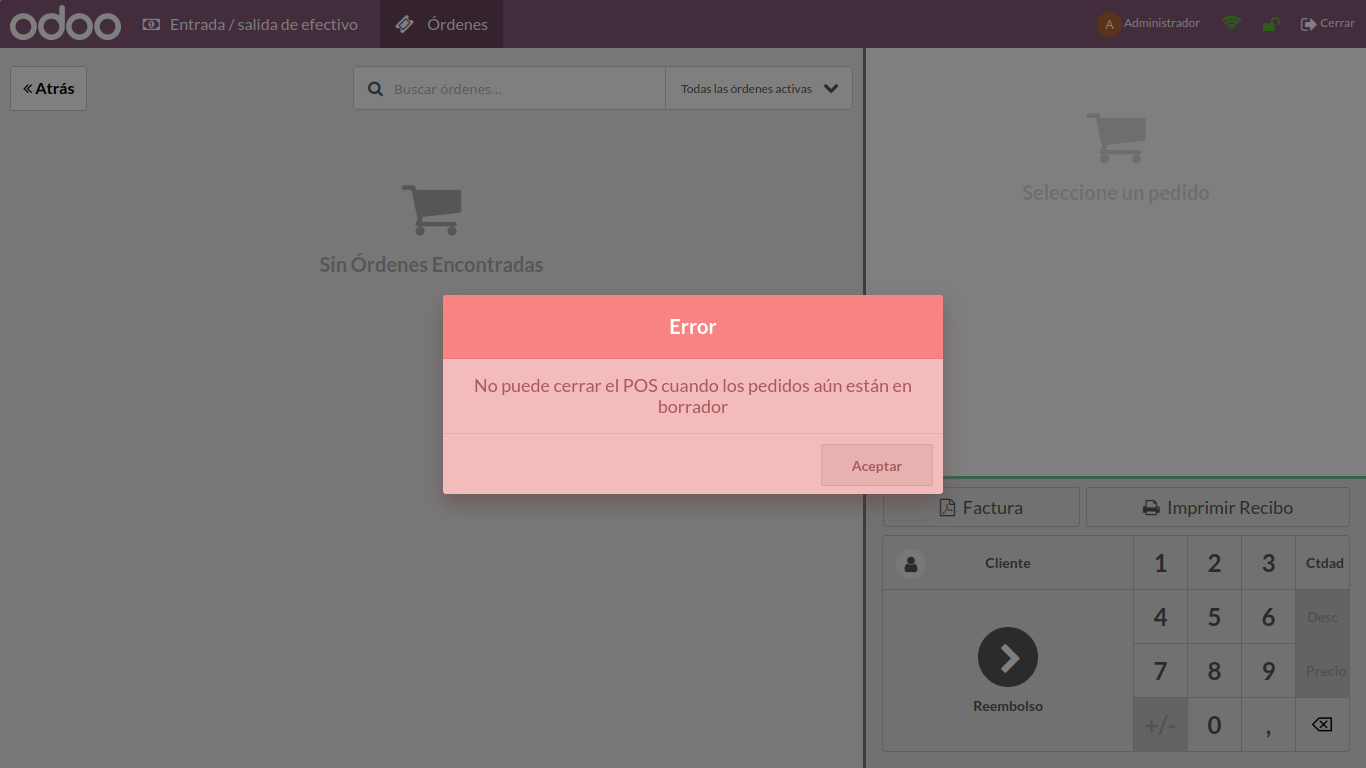
    In some cases, when closing the register, the error shown in the following image may appear


    This happens when there is a brief power or internet outage that goes unnoticed. When this occurs, the system generates an order that may remain in either of these two states.


    "New or Draft"


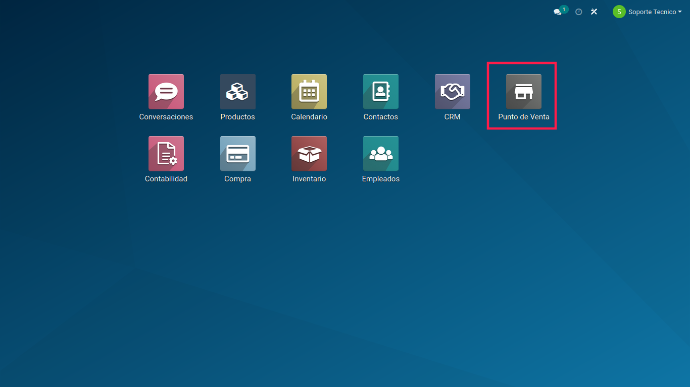
    To delete this order and then close the register, go to the system's main menu and find the "Point of Sale (POS)" module


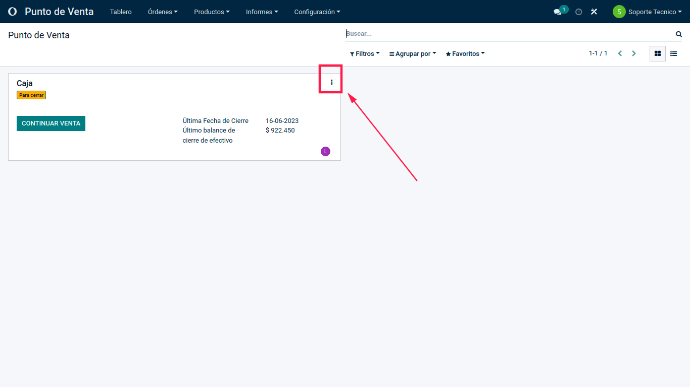
    Inside the module, find the point-of-sale settings under the 3 vertical dots for the affected register.


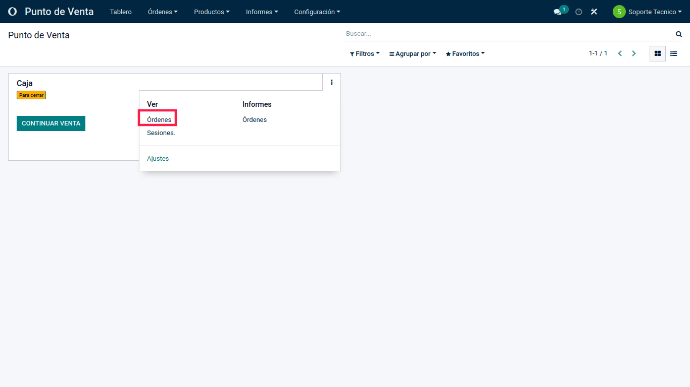
    Clicking the 3 dots opens several options for viewing or generating reports based on that register's orders or sessions.


    In the drop-down menu, find "Orders" in the "View" column.


    Search and browse the order list for the order in "New" or "Draft" status, as shown in the following image.
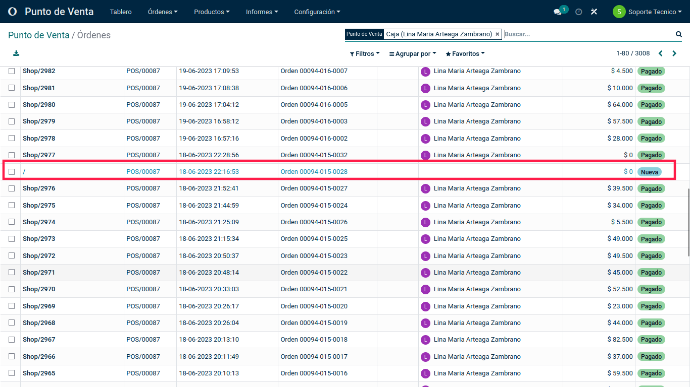


    Select the checkbox to the left of the POS order.


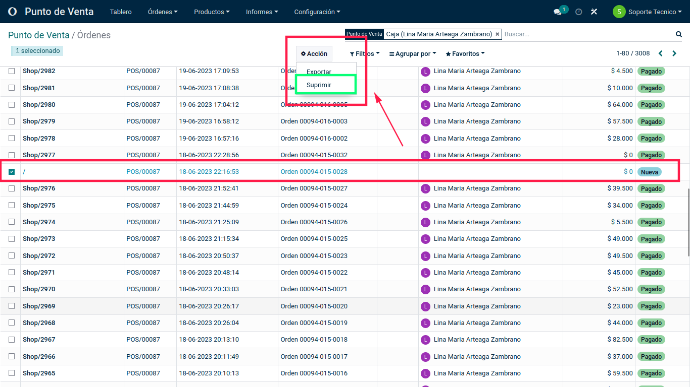
    After selecting the order, delete it using the menu that appears when an order is selected. This menu is near the top center of the screen.


    Find the Delete option. After deleting the order, close and/or open the register in Point of Sale.


    Deleting orders in "New" or "Draft" status in Odoo 15 helps you control transactions and improve Point of Sale management. Removing unfinished orders avoids clutter in the system, making sales reviews and data analysis easier. This is especially relevant in a dynamic setting such as a café, where orders can change quickly. Performing this process regularly contributes to better organization and operational efficiency. Follow these steps and improve order management in Odoo 15!

    in V15 tutorials
    How to Easily Delete Point of Sale Orders in "New" or "Draft" Status
    TORRES PARRA DAVID FERNANDO September 24, 2024
    Share this post
    Tags
    Our blogs
    • Tutorials
    • V15 tutorials
    • News
    • Success stories
    • V17 tutorials
    Archive
    How to Make Inventory Adjustments: 4 Different Methods
    Discover 4 different ways to make inventory adjustments in Odoo 15. Improve stock management with this practical, detailed tutorial.

    Odoo V15

    At eFixPro, we are pleased to offer a series of detailed Odoo v15 tutorials designed to help you get the most out of this powerful business management tool. Our blog is packed with useful resources covering a wide range of topics, from initial setup to advanced features.

    View tutorials

    Odoo V17

    We are excited to introduce our blog dedicated to Odoo v17 tutorials, the latest version of this outstanding business management platform. At eFixPro, we have created resources designed to help you discover and master the new features and improvements in Odoo v17.

    View tutorials
    EFixPro

    We transform businesses with Odoo ERP.

    Services
    • View all
    • Sales
    • Accounting
    • Inventory
    Company
    • About us
    • Success stories
    • Contact us
    Contact

    Calle 49 #49-11

    +57 604 2010998

    [email protected]

    Mon - Fri: 8:00 to 18:00

    © 2026 EFixPro S.A.S. — All rights reserved.
    Terms and conditions Privacy policy
    Powered by Odoo — The best open source eCommerce.