
Skip to Content
EFixPro
  • ERP modules
    • Commerce
    • POS Retail Retail POS
    • CRM CRM
    • sales Sales
    • Subscriptions Subscriptions
    • View all
    • Supply chain
    • Inventory Inventory
    • Purchasing Purchases
    • Manufacturing Manufacturing
    • Products Products
    • Repairs Repairs
    • View all
    • Finance
    • Accounting Accounting
    • Electronic Payroll Electronic payroll
    • electronic invoicing Electronic invoicing
    • Expenses Expenses
    • Documents Documents
    • View all
    • HR
    • Calendar Calendar
    • Employees Employees
    • Projects Projects
    • Helpdesk Helpdesk
    • Contacts Contacts
    • View all
    • Marketing
    • Website Websites
    • Email Marketing Email marketing
    • Events Events
    • Live Chat Live chat
    • Blog Builder Blog builder
    • View all
    • Industries
    • Restaurants and cafés
    • Retail and specialty stores
    • Technical services
    • Construction and maintenance
    • Hospitality and tourism
    • Bakeries and pastry shops
    • View all
    Commerce
    • restaurant-pos Restaurant POS
    • POS Retail Retail POS
    • CRM CRM
    • sales Sales
    • Subscriptions Subscriptions
    • View all
    Supply chain
    • Inventory Inventory
    • Purchasing Purchases
    • Manufacturing Manufacturing
    • Products Products
    • Repairs Repairs
    • View all
    Finance
    • Accounting Accounting
    • Electronic Payroll Electronic payroll
    • electronic invoicing Electronic invoicing
    • Expenses Expenses
    • Documents Documents
    • View all
    HR
    • Calendar Calendar
    • Employees Employees
    • Projects Projects
    • Helpdesk Helpdesk
    • Contacts Contacts
    • View all
    Marketing
    • Website Websites
    • Email Marketing Email marketing
    • Events Events
    • Live Chat Live chat
    • Blog Builder Blog builder
    • View all
    Industries
    • Restaurants and cafés
    • Retail and specialty stores
    • Technical services
    • Construction and maintenance
    • Hospitality and tourism
    • Bakeries and pastry shops
    • View all

    • Contact us
    • ​ Book a sales consultation
    • Live chat
  • EDUCATION
  • Industries
    • Restaurants and cafés
    • Retail and distribution
    • Technical services
  • ABOUT US
    • OUR COMPANY
    • SUCCESS STORIES
  • CONTACT US
    • Support

    • Service appointments
    • Group training (level 1)
    • Personalized session (non-accounting)
    • Accounting consultation
  • 0
  • 0
  • English (US) Español (CO)
  • Sign in
  • Book a sales consultation
EFixPro
  • 0
  • 0
    • ERP modules
    • EDUCATION
    • Industries
      • Restaurants and cafés
      • Retail and distribution
      • Technical services
    • ABOUT US
      • OUR COMPANY
      • SUCCESS STORIES
    • CONTACT US
      • Support
      • Service appointments
      • Group training (level 1)
      • Personalized session (non-accounting)
      • Accounting consultation
  • Book a sales consultation
  • English (US) Español (CO)
  • Sign in

How to Create Custom Units of Measure

Discover how to create custom units of measure in Odoo 15. Improve inventory management and sales processes with this tutorial for different types of business.
  • All Blogs
  • V15 tutorials
  • How to Create Custom Units of Measure
  • September 24, 2024 by
    How to Create Custom Units of Measure
    TORRES PARRA DAVID FERNANDO

    Custom units of measure are essential for businesses that need flexible inventory control. For example, a customer in a supermarket or neighborhood store may buy a tray of eggs (equivalent to 30 units) or just 10 eggs. Creating custom units of measure in Odoo 15 lets you manage these transactions accurately. This article explains how to configure them for businesses that sell variable amounts, by weight, volume or individual quantity, and need detailed inventory control.

    Administrator permissions are required to create custom units of measure.


    Go to the main POS menu, where all system modules are displayed.
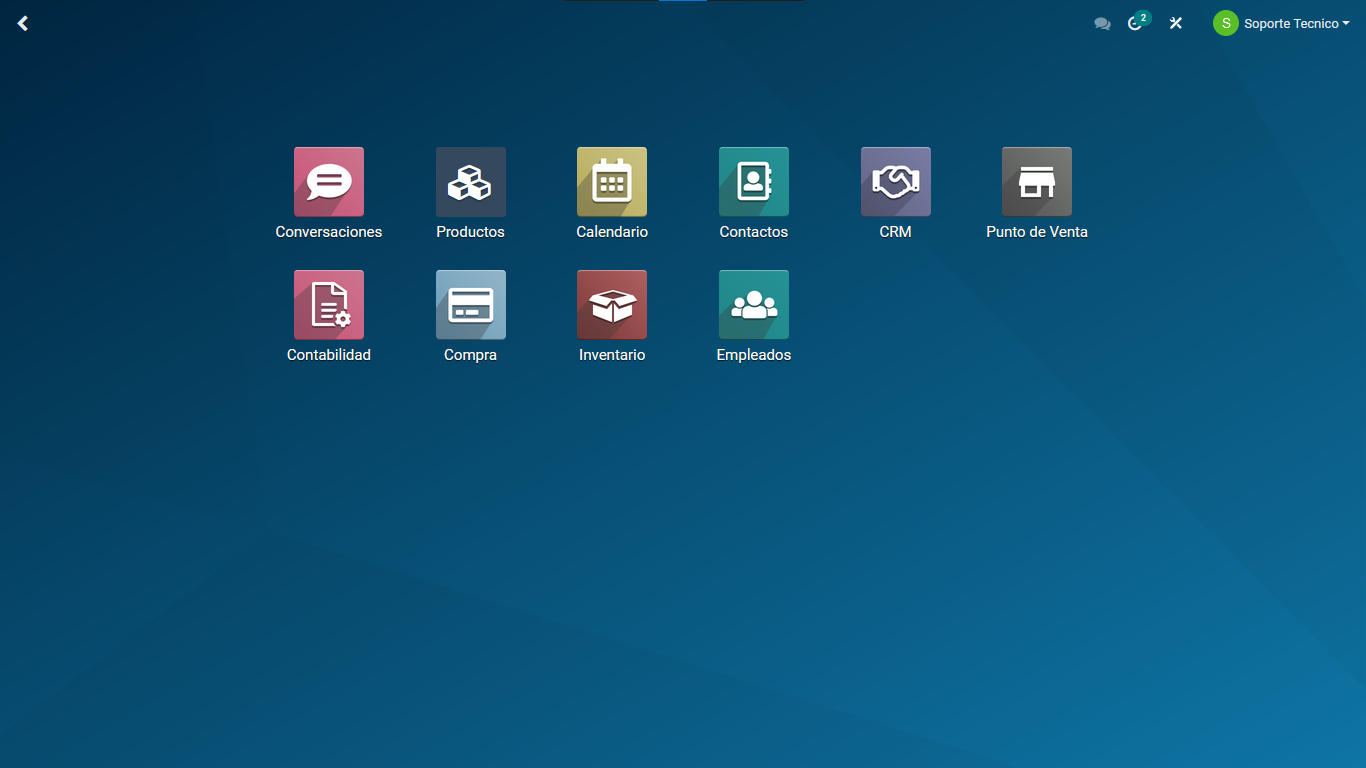


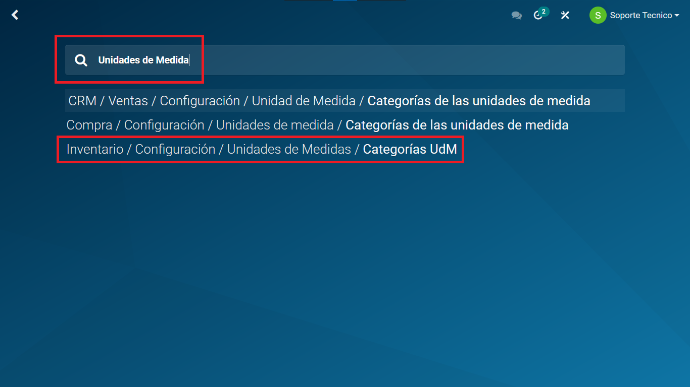
    Start typing "Units of Measure" in this view. The system will generate a search field containing your text.


    Select "Inventory / Configuration / Units of Measure / UoM Categories".


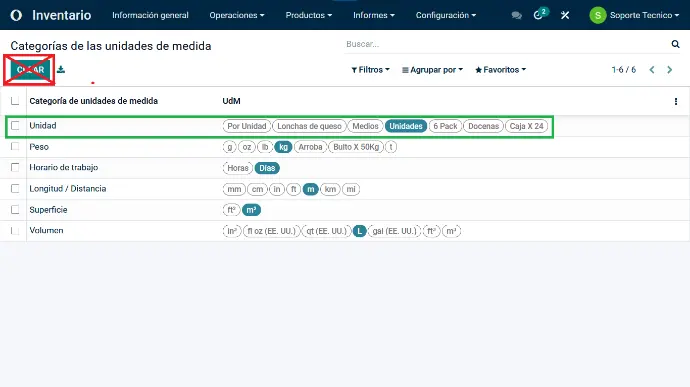
    The view displays the system's default units of measure. Only these should appear.


    (If other units appear in addition to those shown, contact support.)


    Click the required unit of measure in this view. For this example, we will work with UNITS.


    Do not click the create button, as this can cause conflicts in the system.


    Opening the units view displays the SUB-UNITS of the UNITS unit of measure.


    You can also check here that you are in the required category.


    Click "Add a line" at the bottom left of the list to enable an additional field.
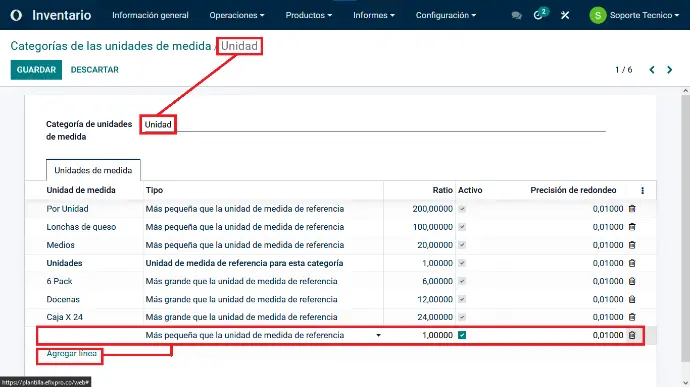


    For this example, we will use a product that we buy wholesale from suppliers but sell retail as individual units.


    Example:


        - We purchase a box containing 100 units of a product from a supplier.


        - When purchasing it, we record it as one unit containing 100 units for sale, for a given amount representing the total price of the entire box.


        - We need to sell this product as individual units, so we create the "Item per Unit" unit of measure.


        - Since we receive the 100 products in one box, mark this unit of measure as smaller than the reference unit.


        - Enter how many items the box contains in the Ratio column by selecting the whole number and entering the final quantity.
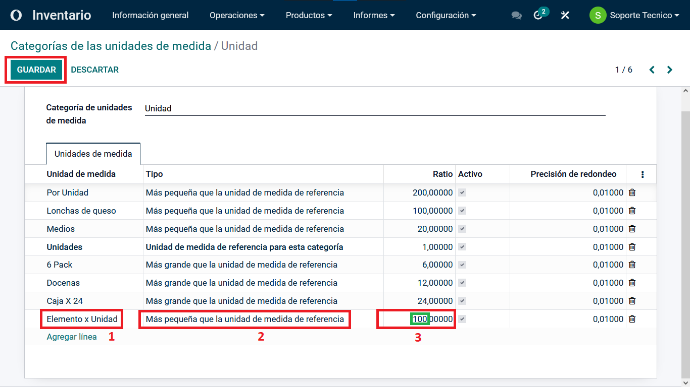


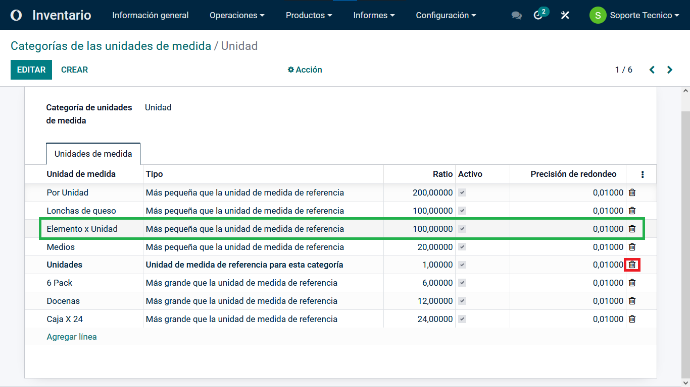
    Save the unit of measure. It should appear as shown here.


    You can also delete previously created units of measure here by clicking the trash icon. Make sure none of the units you want to delete are associated with a product.


    After completing this process, you can apply the price for that unit of measure to your products.


    Custom units of measure in Odoo 15 give business owners, such as supermarkets and small stores, precise inventory control whether products are sold in bulk or individually. Imagine being able to record a customer's purchase of half a kilo of cheese instead of a whole package, or 5 eggs instead of a dozen. This flexibility and control improve operational efficiency and help you meet your customers' needs. Start customizing your units of measure and improve your business management with Odoo 15!

    in V15 tutorials
    How to Create Custom Units of Measure
    TORRES PARRA DAVID FERNANDO September 24, 2024
    Share this post
    Tags
    Our blogs
    • Tutorials
    • V15 tutorials
    • News
    • Success stories
    • V17 tutorials
    Archive
    How to Close the Cash Register in Point of Sale
    Learn how to close the cash register in Odoo 15 Point of Sale quickly and efficiently. Ensure proper financial management with this tutorial.

    Odoo V15

    At eFixPro, we are pleased to offer a series of detailed Odoo v15 tutorials designed to help you get the most out of this powerful business management tool. Our blog is packed with useful resources covering a wide range of topics, from initial setup to advanced features.

    View tutorials

    Odoo V17

    We are excited to introduce our blog dedicated to Odoo v17 tutorials, the latest version of this outstanding business management platform. At eFixPro, we have created resources designed to help you discover and master the new features and improvements in Odoo v17.

    View tutorials
    EFixPro

    We transform businesses with Odoo ERP.

    Services
    • View all
    • Sales
    • Accounting
    • Inventory
    Company
    • About us
    • Success stories
    • Contact us
    Contact

    Calle 49 #49-11

    +57 604 2010998

    [email protected]

    Mon - Fri: 8:00 to 18:00

    © 2026 EFixPro S.A.S. — All rights reserved.
    Terms and conditions Privacy policy
    Powered by Odoo — The best open source eCommerce.