
Skip to Content
EFixPro
  • ERP modules
    • Commerce
    • POS Retail Retail POS
    • CRM CRM
    • sales Sales
    • Subscriptions Subscriptions
    • View all
    • Supply chain
    • Inventory Inventory
    • Purchasing Purchases
    • Manufacturing Manufacturing
    • Products Products
    • Repairs Repairs
    • View all
    • Finance
    • Accounting Accounting
    • Electronic Payroll Electronic payroll
    • electronic invoicing Electronic invoicing
    • Expenses Expenses
    • Documents Documents
    • View all
    • HR
    • Calendar Calendar
    • Employees Employees
    • Projects Projects
    • Helpdesk Helpdesk
    • Contacts Contacts
    • View all
    • Marketing
    • Website Websites
    • Email Marketing Email marketing
    • Events Events
    • Live Chat Live chat
    • Blog Builder Blog builder
    • View all
    • Industries
    • Restaurants and cafés
    • Retail and specialty stores
    • Technical services
    • Construction and maintenance
    • Hospitality and tourism
    • Bakeries and pastry shops
    • View all
    Commerce
    • restaurant-pos Restaurant POS
    • POS Retail Retail POS
    • CRM CRM
    • sales Sales
    • Subscriptions Subscriptions
    • View all
    Supply chain
    • Inventory Inventory
    • Purchasing Purchases
    • Manufacturing Manufacturing
    • Products Products
    • Repairs Repairs
    • View all
    Finance
    • Accounting Accounting
    • Electronic Payroll Electronic payroll
    • electronic invoicing Electronic invoicing
    • Expenses Expenses
    • Documents Documents
    • View all
    HR
    • Calendar Calendar
    • Employees Employees
    • Projects Projects
    • Helpdesk Helpdesk
    • Contacts Contacts
    • View all
    Marketing
    • Website Websites
    • Email Marketing Email marketing
    • Events Events
    • Live Chat Live chat
    • Blog Builder Blog builder
    • View all
    Industries
    • Restaurants and cafés
    • Retail and specialty stores
    • Technical services
    • Construction and maintenance
    • Hospitality and tourism
    • Bakeries and pastry shops
    • View all

    • Contact us
    • ​ Book a sales consultation
    • Live chat
  • EDUCATION
  • Industries
    • Restaurants and cafés
    • Retail and distribution
    • Technical services
  • ABOUT US
    • OUR COMPANY
    • SUCCESS STORIES
  • CONTACT US
    • Support

    • Service appointments
    • Group training (level 1)
    • Personalized session (non-accounting)
    • Accounting consultation
  • 0
  • 0
  • English (US) Español (CO)
  • Sign in
  • Book a sales consultation
EFixPro
  • 0
  • 0
    • ERP modules
    • EDUCATION
    • Industries
      • Restaurants and cafés
      • Retail and distribution
      • Technical services
    • ABOUT US
      • OUR COMPANY
      • SUCCESS STORIES
    • CONTACT US
      • Support
      • Service appointments
      • Group training (level 1)
      • Personalized session (non-accounting)
      • Accounting consultation
  • Book a sales consultation
  • English (US) Español (CO)
  • Sign in

How to Create a PIN Code for Point of Sale Register Access

Learn how to create a PIN code for register access in Odoo 15 Point of Sale and improve business security. A step-by-step tutorial.
  • All Blogs
  • V15 tutorials
  • How to Create a PIN Code for Point of Sale Register Access
  • September 24, 2024 by
    How to Create a PIN Code for Point of Sale Register Access
    TORRES PARRA DAVID FERNANDO

    Creating a PIN code for register access in Odoo 15 Point of Sale (POS) is a security measure that controls who accesses the system and when. This feature is especially useful for businesses such as restaurants, retail stores or supermarkets, where several employees operate the cash register. For example, in a convenience store, each cashier can have an individual PIN to access the register, allowing detailed tracking of each employee's transactions. In this article, we show you how to create these codes in Odoo 15 to improve security and traceability in Point of Sale.

    Let's go through the steps

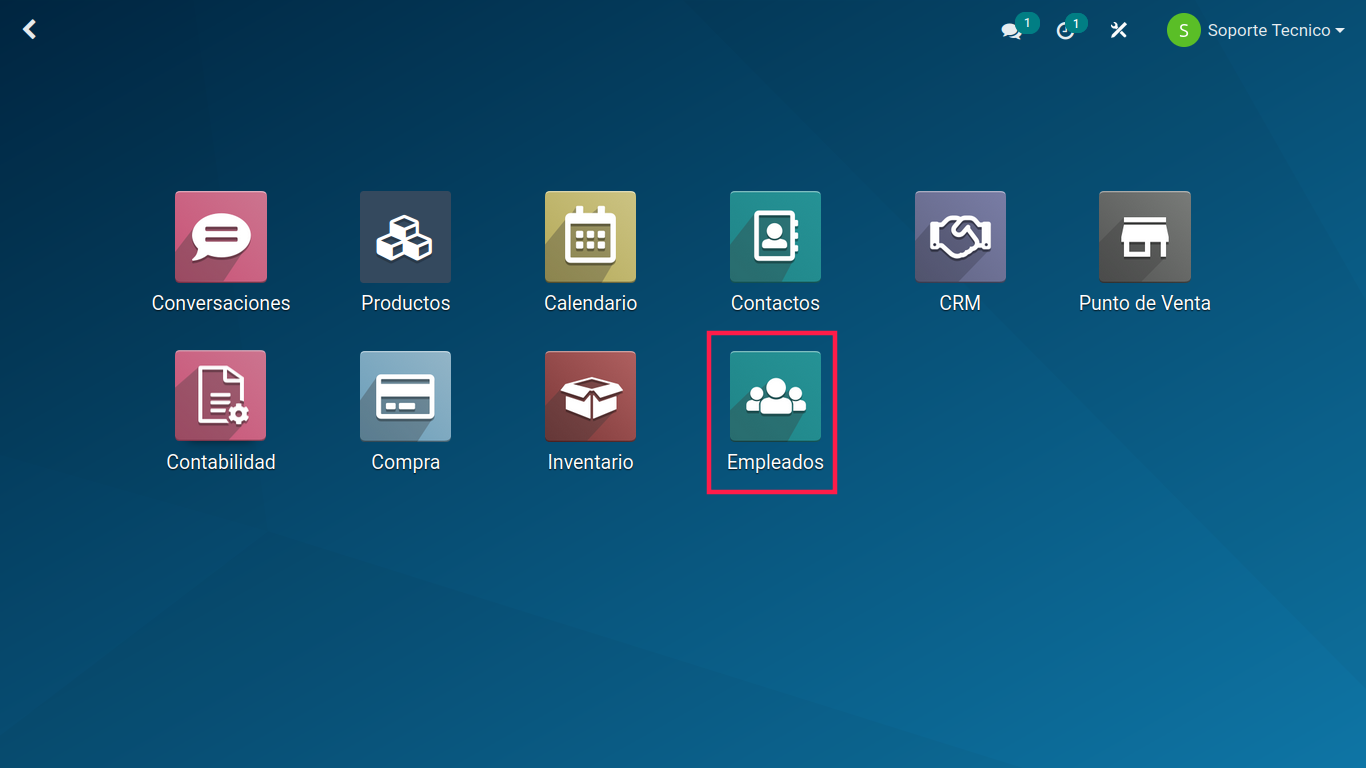
    Open the Employees module in your Odoo system.


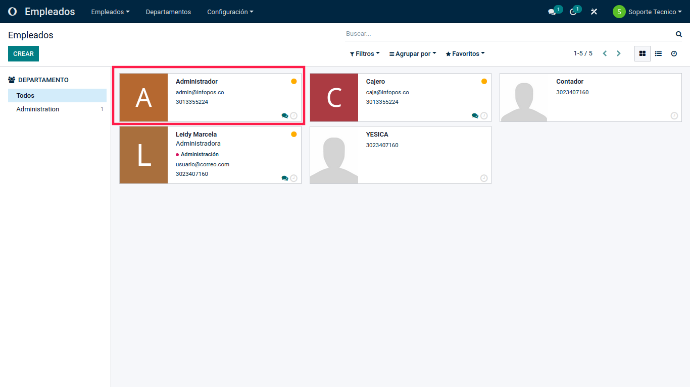
    Select the employee to whom you want to assign a PIN code.


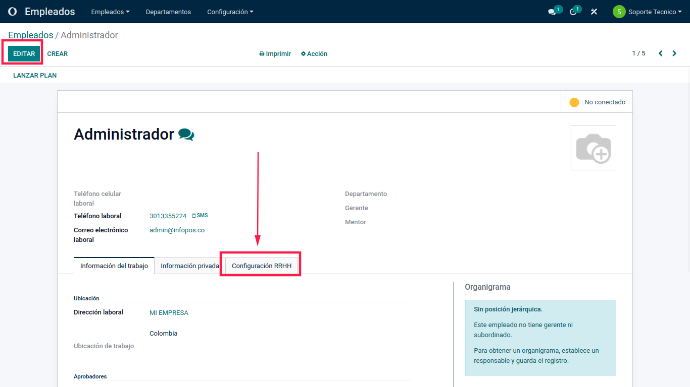
    Click "Edit" in the upper-right corner of the employee details page.


    Click "HR Settings".


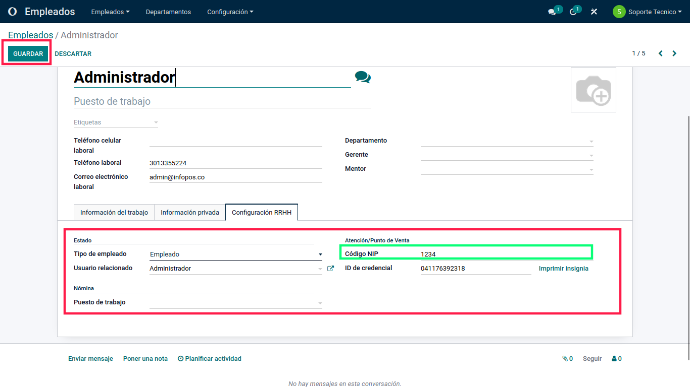
    Enter a number of at least four digits and no more than 16 digits in the "PIN" or "PIN Code" field. Only numbers are allowed, without letters or special characters.


    Click "Save" to save the changes and assign the PIN code to the employee.


    The PIN code is a security measure used in the Attendances module, allowing employees to record their attendance in the system. Each employee has a unique PIN that can be used to access POS if access permissions have been configured that way.


    The PIN code is used to record employee attendance in the Attendances module and can only be used to access POS if access permissions have been configured that way. Configure access permissions correctly and make sure PIN codes are secure and are not shared between employees.


    Configuring a PIN code for register access in Odoo 15 is an excellent way to improve business security. Whether you run a restaurant, clothing store or supermarket chain, this feature gives you greater control over who accesses the register and which transactions they perform. It protects your business against possible errors or fraud and makes it easier to assign responsibility to each employee. Implementing this tool in Point of Sale provides greater peace of mind and improves register management. Follow these steps and strengthen your business's security with Odoo 15!

    in V15 tutorials
    How to Create a PIN Code for Point of Sale Register Access
    TORRES PARRA DAVID FERNANDO September 24, 2024
    Share this post
    Tags
    Our blogs
    • Tutorials
    • V15 tutorials
    • News
    • Success stories
    • V17 tutorials
    Archive
    How to Check Customer Credit Accounts in Point of Sale (POS)
    Learn how to check accounts paid on credit in Point of Sale in Odoo 15 and improve customer credit management. A step-by-step tutorial.

    Odoo V15

    At eFixPro, we are pleased to offer a series of detailed Odoo v15 tutorials designed to help you get the most out of this powerful business management tool. Our blog is packed with useful resources covering a wide range of topics, from initial setup to advanced features.

    View tutorials

    Odoo V17

    We are excited to introduce our blog dedicated to Odoo v17 tutorials, the latest version of this outstanding business management platform. At eFixPro, we have created resources designed to help you discover and master the new features and improvements in Odoo v17.

    View tutorials
    EFixPro

    We transform businesses with Odoo ERP.

    Services
    • View all
    • Sales
    • Accounting
    • Inventory
    Company
    • About us
    • Success stories
    • Contact us
    Contact

    Calle 49 #49-11

    +57 604 2010998

    [email protected]

    Mon - Fri: 8:00 to 18:00

    © 2026 EFixPro S.A.S. — All rights reserved.
    Terms and conditions Privacy policy
    Powered by Odoo — The best open source eCommerce.