
Skip to Content
EFixPro
  • ERP modules
    • Commerce
    • POS Retail Retail POS
    • CRM CRM
    • sales Sales
    • Subscriptions Subscriptions
    • View all
    • Supply chain
    • Inventory Inventory
    • Purchasing Purchases
    • Manufacturing Manufacturing
    • Products Products
    • Repairs Repairs
    • View all
    • Finance
    • Accounting Accounting
    • Electronic Payroll Electronic payroll
    • electronic invoicing Electronic invoicing
    • Expenses Expenses
    • Documents Documents
    • View all
    • HR
    • Calendar Calendar
    • Employees Employees
    • Projects Projects
    • Helpdesk Helpdesk
    • Contacts Contacts
    • View all
    • Marketing
    • Website Websites
    • Email Marketing Email marketing
    • Events Events
    • Live Chat Live chat
    • Blog Builder Blog builder
    • View all
    • Industries
    • Restaurants and cafés
    • Retail and specialty stores
    • Technical services
    • Construction and maintenance
    • Hospitality and tourism
    • Bakeries and pastry shops
    • View all
    Commerce
    • restaurant-pos Restaurant POS
    • POS Retail Retail POS
    • CRM CRM
    • sales Sales
    • Subscriptions Subscriptions
    • View all
    Supply chain
    • Inventory Inventory
    • Purchasing Purchases
    • Manufacturing Manufacturing
    • Products Products
    • Repairs Repairs
    • View all
    Finance
    • Accounting Accounting
    • Electronic Payroll Electronic payroll
    • electronic invoicing Electronic invoicing
    • Expenses Expenses
    • Documents Documents
    • View all
    HR
    • Calendar Calendar
    • Employees Employees
    • Projects Projects
    • Helpdesk Helpdesk
    • Contacts Contacts
    • View all
    Marketing
    • Website Websites
    • Email Marketing Email marketing
    • Events Events
    • Live Chat Live chat
    • Blog Builder Blog builder
    • View all
    Industries
    • Restaurants and cafés
    • Retail and specialty stores
    • Technical services
    • Construction and maintenance
    • Hospitality and tourism
    • Bakeries and pastry shops
    • View all

    • Contact us
    • ​ Book a sales consultation
    • Live chat
  • EDUCATION
  • Industries
    • Restaurants and cafés
    • Retail and distribution
    • Technical services
  • ABOUT US
    • OUR COMPANY
    • SUCCESS STORIES
  • CONTACT US
    • Support

    • Service appointments
    • Group training (level 1)
    • Personalized session (non-accounting)
    • Accounting consultation
  • 0
  • 0
  • English (US) Español (CO)
  • Sign in
  • Book a sales consultation
EFixPro
  • 0
  • 0
    • ERP modules
    • EDUCATION
    • Industries
      • Restaurants and cafés
      • Retail and distribution
      • Technical services
    • ABOUT US
      • OUR COMPANY
      • SUCCESS STORIES
    • CONTACT US
      • Support
      • Service appointments
      • Group training (level 1)
      • Personalized session (non-accounting)
      • Accounting consultation
  • Book a sales consultation
  • English (US) Español (CO)
  • Sign in

How to check product movements in Inventory

Learn how to check product movements in Odoo 15 Inventory. Optimize stock management and maintain accurate control with this practical tutorial.
  • All Blogs
  • V15 tutorials
  • How to check product movements in Inventory
  • September 24, 2024 by
    How to check product movements in Inventory
    TORRES PARRA DAVID FERNANDO

    Checking product movements in inventory is an essential task for any business that manages stock, whether a supermarket, an electronics store or a distribution warehouse. It lets you track every incoming and outgoing product movement, keeping your inventory up to date. For example, reviewing product movements in a grocery store helps you identify the best-selling items and products with low stock, so you can make informed purchasing decisions. In this article, we will show you how to check product movements in Odoo 15 to manage your inventory efficiently and effectively.

    The Odoo Inventory module is essential for efficiently managing the flow of products within a company. It supports detailed stock tracking, optimized inventory management and more accurate business operations.


    The Odoo Inventory module includes the ability to check product movements, whether transfers between warehouses, purchases, sales or other operations.


    In this detailed tutorial, we will explore how to check product movements within the module. This skill is crucial for internal checks and for knowing the status of a specific product that needs follow-up by the relevant department.

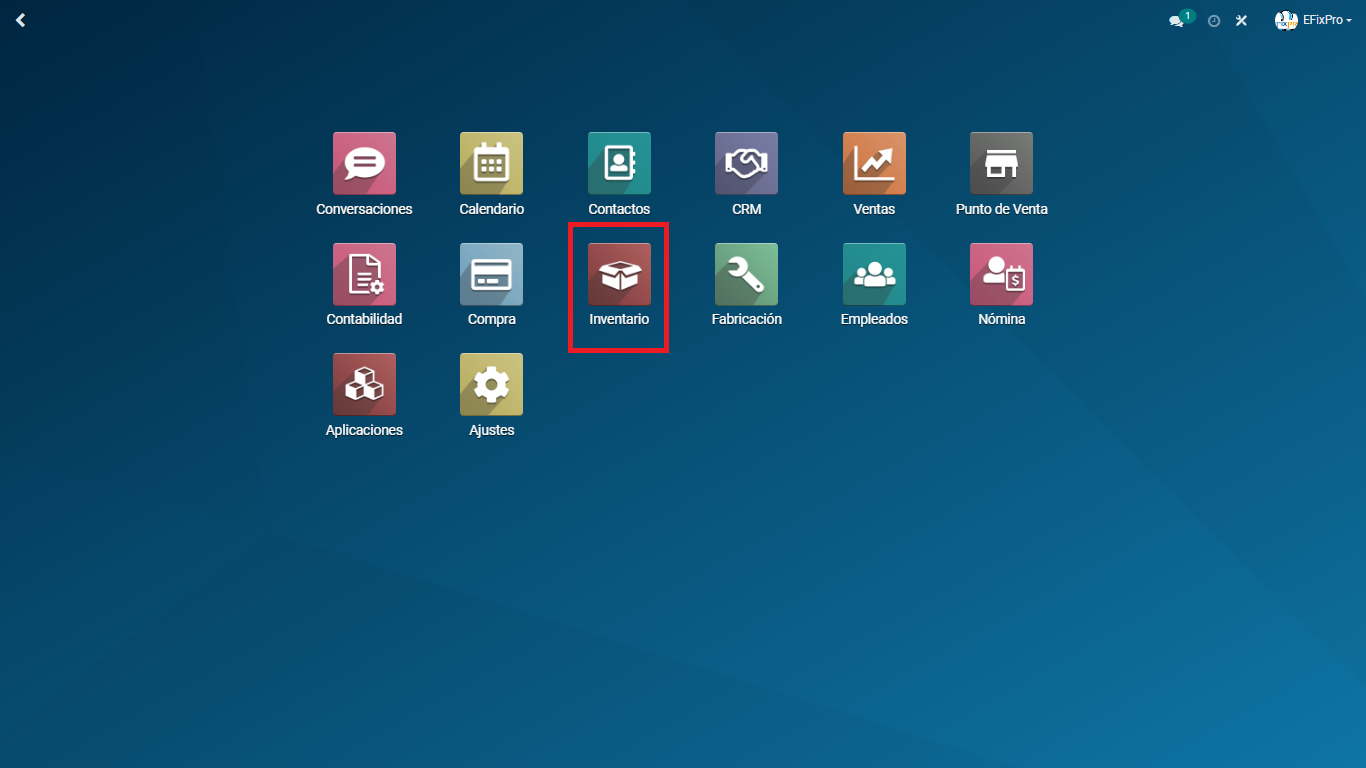
    From the Odoo main menu, go to "Inventory".


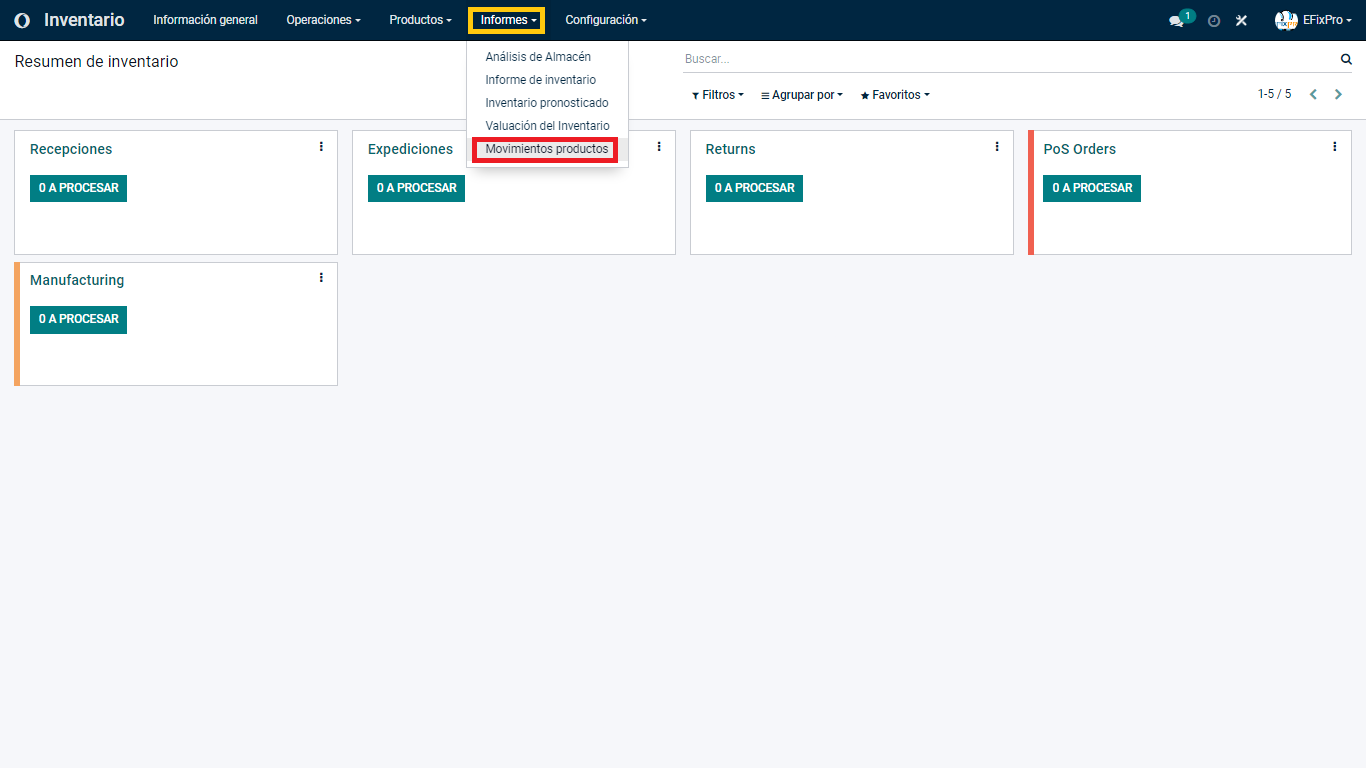
    Once inside the Inventory module, you will see several options in its top menu. Here, we are interested in the "Reporting" tab and its "Product Moves" option.


    For this example, we created a sample database with a few basic products.


    In this view, you can identify several product movements, some filters applied by default, and abbreviations for each type of product movement recorded in the system.
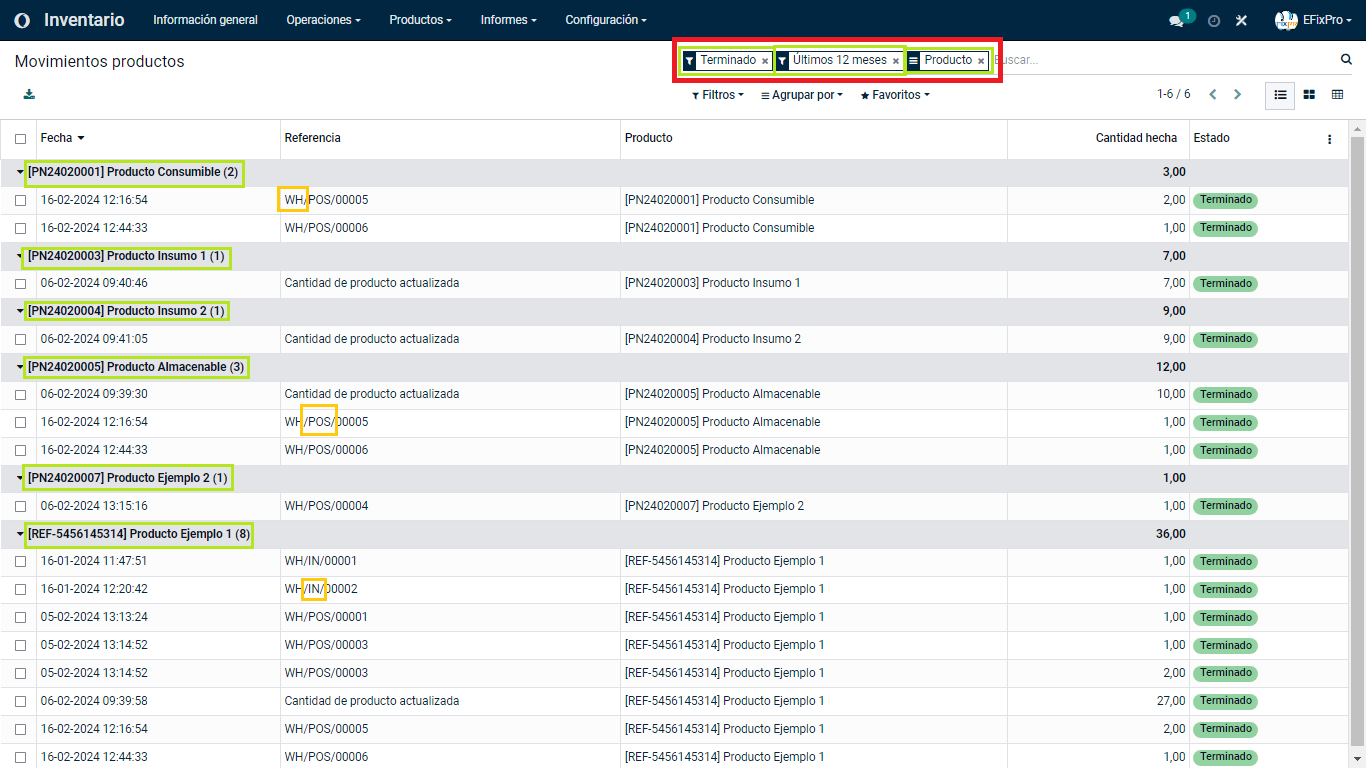


    Let us identify the meaning of each element shown in this view


    Filters:


        - Done: This indicates that all product movements have a completed status, meaning that no additional action is needed for the relevant product process.


        - Last 12 months: This filter shows all product movements recorded in the database during the last 12 calendar months.


        - Product: This filter groups each action by the products created in the database that also have a movement recorded in the system.

    (To learn more about applying filters to any information form in your database, visit this step-by-step article for a more detailed explanation.)


    With these filters applied, the Reference column may show unfamiliar terms. These terms are created automatically by the system. If you would like your own abbreviations, ask your sales advisor about a custom development.


    To learn the meaning of some of these labels, visit our Odoo Glossary of Terms.

    Applying different display filters can produce different results. In this example, I will guide you through viewing product movements grouped by "LOCATION AND STATUS". We will see how to display all movements from the last quarter of the previous period and the first quarter of the current period.

    Filters:

        - Last quarter of the previous period

        - First quarter of the current period


    Grouped by:

        - Location

        - Status
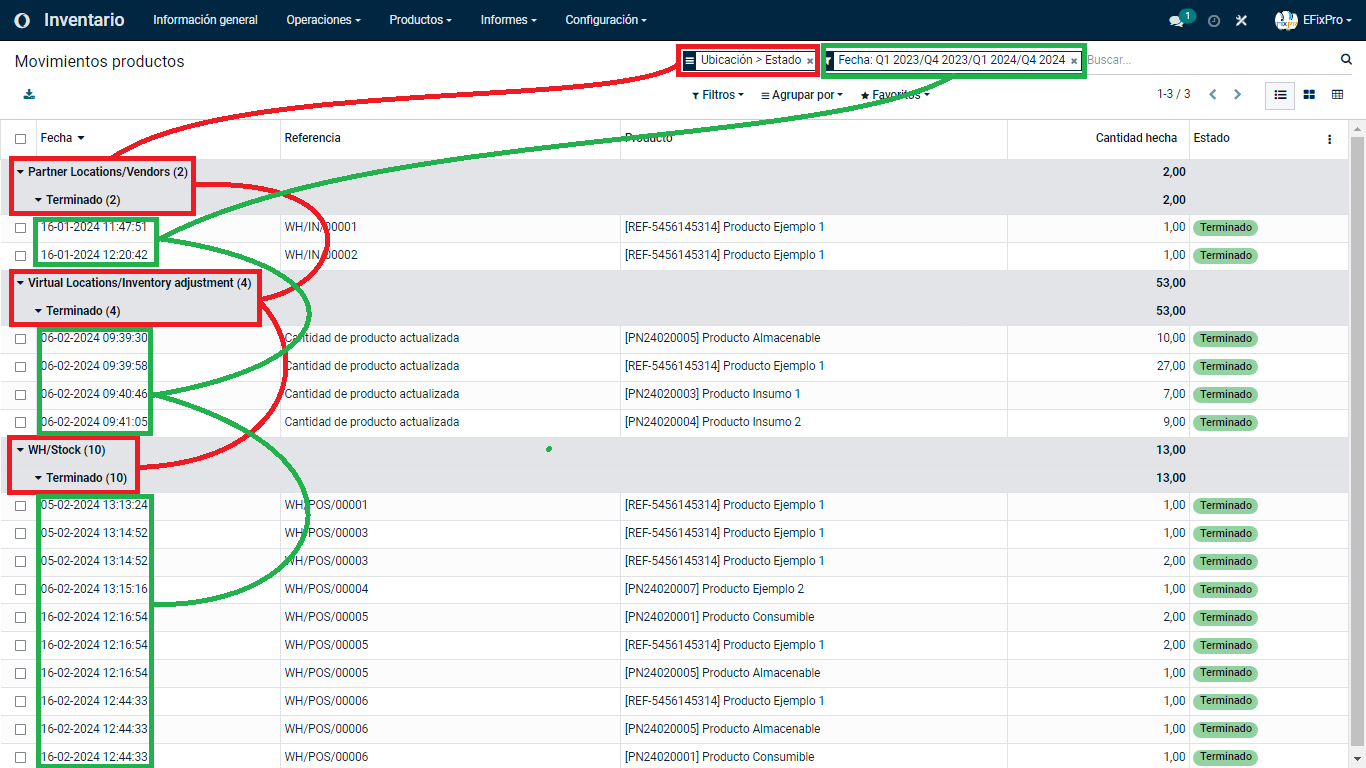


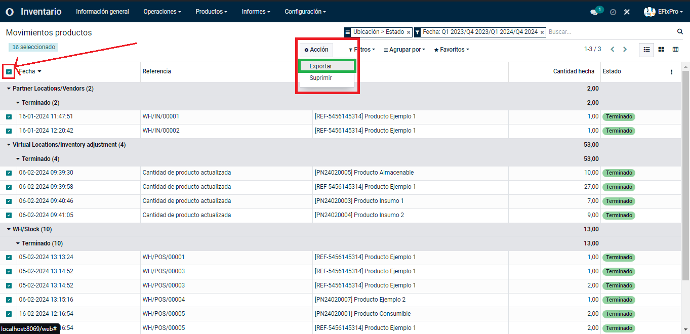
    Finally, to export all the information provided by the database or a specific selection, select the checkboxes at the top left, next to the "Date" column. You can then select all movements and easily export them to an Excel pivot table.


    Learning to check product movements in Odoo 15 gives you more accurate control over inventory, which is crucial for any business. If you run a clothing store, for example, knowing each garment's movements helps you manage purchases and provide a more satisfying shopping experience. This practice improves inventory management while helping you prevent losses and maximize profits. Add this skill to your daily routine and improve your business's operational efficiency with Odoo 15.

    in V15 tutorials
    How to check product movements in Inventory
    TORRES PARRA DAVID FERNANDO September 24, 2024
    Share this post
    Tags
    Our blogs
    • Tutorials
    • V15 tutorials
    • News
    • Success stories
    • V17 tutorials
    Archive
    What Is the Opening Balance Difference?
    Discover what the Opening Difference Balance is in Odoo 15 and how it affects financial management. Learn to interpret and apply it in your business with this tutorial.

    Odoo V15

    At eFixPro, we are pleased to offer a series of detailed Odoo v15 tutorials designed to help you get the most out of this powerful business management tool. Our blog is packed with useful resources covering a wide range of topics, from initial setup to advanced features.

    View tutorials

    Odoo V17

    We are excited to introduce our blog dedicated to Odoo v17 tutorials, the latest version of this outstanding business management platform. At eFixPro, we have created resources designed to help you discover and master the new features and improvements in Odoo v17.

    View tutorials
    EFixPro

    We transform businesses with Odoo ERP.

    Services
    • View all
    • Sales
    • Accounting
    • Inventory
    Company
    • About us
    • Success stories
    • Contact us
    Contact

    Calle 49 #49-11

    +57 604 2010998

    [email protected]

    Mon - Fri: 8:00 to 18:00

    © 2026 EFixPro S.A.S. — All rights reserved.
    Terms and conditions Privacy policy
    Powered by Odoo — The best open source eCommerce.